BlueMap Addon
Can't find where to download the JAR? Click here.
The BlueMap Addon allows QuickShop to display shops directly on your BlueMap web map.
Players can view:
- Shop locations
- Item being sold or bought
- Price
- Stock
- Owner
- Shop type
As of 6.2.0.11, the BlueMap addon now supports colored markers based on shop state.
New in 6.2.0.11
The BlueMap addon now supports:
- Colored markers based on shop type/state
- Improved compatibility with the new ShopType system
- Better synchronization with the revamped event system
- More accurate updates when shop type changes
Markers now visually reflect:
- SELLING shops
- BUYING shops
- FROZEN shops
This makes it easier for players to understand shop behavior directly from the map.
Showcase
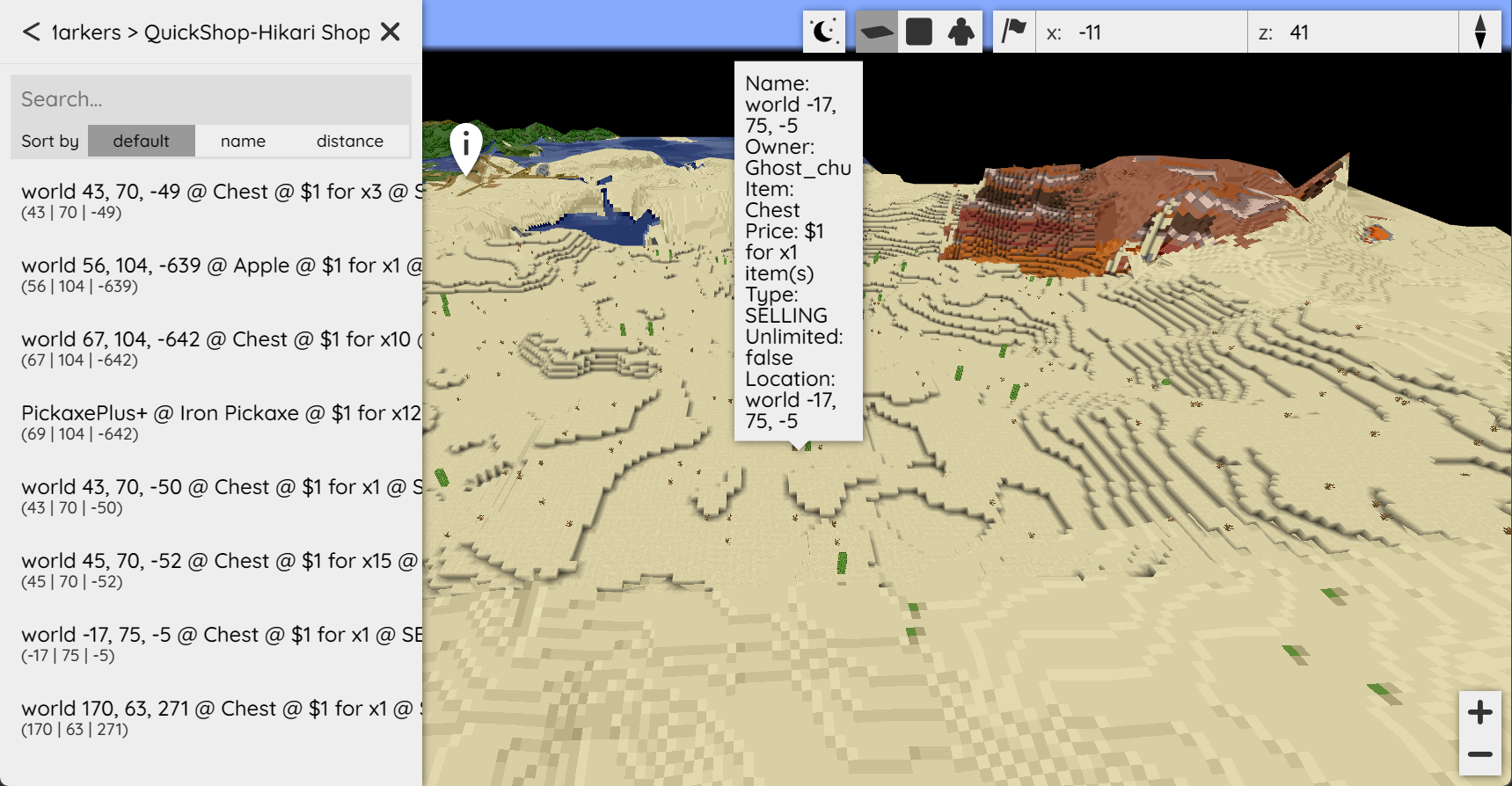
How It Works
When a shop is:
- Created
- Removed
- Updated
- Frozen or unfrozen
- Switched between BUYING/SELLING
The BlueMap addon automatically updates the marker.
Markers are:
- Added when shops are created
- Removed when shops are deleted
- Updated when price, stock, or type changes
No manual refresh required.
Colored Markers
Markers can now display different colors depending on shop state.
Typical behavior:
- Selling shops → default color
- Buying shops → alternate color
- Frozen shops → disabled / muted color
This makes it easy to visually distinguish shop types on the map.
The color logic follows the new shop type system introduced in 6.2.0.11.
Configuration
config-version: 1

# If you want the marker set/markers to display by default when opening the map.
display-by-default: true

# Location for the image you want as your QuickShop marker.
# Default is inside the BlueMap assets folder.
icon-file-location: "/assets/chest.png"

# Display the marker icon on the map.
display-icon: true

# Maximum distance at which markers are visible.
# Lower values may improve performance on large servers.
max-distance: 1000

# Marker label shown in the marker list.
# Available placeholders:
# %item%, %price%, %stock%, %owner%, %type%, %location%
marker-label: "%item%, %price%, %stock%, %owner%, %type%"

# Popup text when clicking a marker.
marker-detail: '<span style="font-size: 120%">Chest Shop</span><hr><span>Owner: <strong>%owner%</strong></span><br><span>Item: <strong>%item%</strong></span><br><span>Price: <strong>%price%</strong></span><br><span>Stock: <strong>%stock%</strong></span><br><span>Type: <strong>%type%</strong></span><br><span>Location: <strong>%location%</strong></span>'

# How many times per second does the plugin refresh the shops?
refresh-per-seconds: 5
Placeholders
The following placeholders are available:
%item%%price%%stock%%owner%%type%%location%
These reflect live shop data and update automatically.
Performance
To optimize performance:
- Lower
refresh-per-secondson large servers. - Reduce
max-distanceto limit rendering range. - Avoid extremely high shop density in a single area.
The addon is event-driven and only refreshes when necessary.
Localization
The BlueMap Addon uses the game-language setting from your QuickShop configuration.
You can customize marker text via QuickShop’s Localization System:
See: modules/localization.md
Installation
- Install BlueMap.
- Install the QuickShop BlueMap Addon.
- Restart your server.
If BlueMap is not detected, the addon remains inactive.
Summary
The BlueMap Addon:
- Displays shops on your web map
- Updates automatically
- Supports colored markers by shop state (6.2.0.11+)
- Integrates with the new shop type system
- Requires minimal configuration
It is recommended for servers that want a modern, web-based shop overview.